Sponsored by KONE Design
KONE Design gave us an open-ended challenge: explore the role of an AI concierge in the elevator, and design a joyful experience for passengers.
Role: Interaction Designer (as part of group of 4)
Course: Experience Design Project
Tools: Figma, Miro
Duration: 3 months
An AI Companion for elevator riders
Designing for when the AI should not be present
Generative AI is becoming omnicompetent. It can be marvelous as a productivity tool, but what role does it play when the goal is to increase a user’s joy? And how willing are people (when they are tired, distracted, or seeking intimacy) to interact with a product they didn't ask for?
These questions led us to shape our core question that is counter-intuitive to conventional product design: when should our product stay out of the way?
These questions led us to shape our core question that is counter-intuitive to conventional product design: when should our product stay out of the way?
The elevator as an interface.
We grounded the concept in modern, budget-friendly hotels, and we designed for hotel guests navigating an unfamiliar city. The concierge has a chance to learn the user’s preferences over their stay.
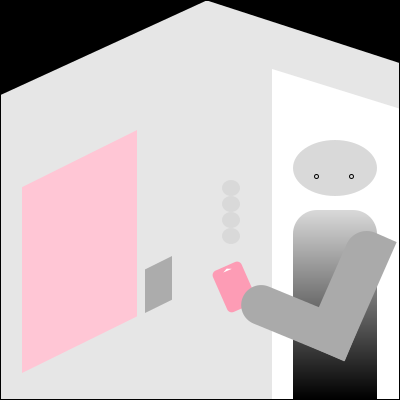
We designed the concierge as a built-in screen within the hotel elevator, positioned from roughly waist height upward to make interaction comfortable and accessible for most guests. We connected each guest’s interaction data to their room key card, as most hotels already require them to tap the same card to access their floor. This allows the concierge to recognize guests seamlessly without requiring additional input.
Naturally, privacy was designed into the system. A guest's interaction data is automatically erased as they check out to ensure that the concierge does not retain information beyond their stay.
We designed the concierge as a built-in screen within the hotel elevator, positioned from roughly waist height upward to make interaction comfortable and accessible for most guests. We connected each guest’s interaction data to their room key card, as most hotels already require them to tap the same card to access their floor. This allows the concierge to recognize guests seamlessly without requiring additional input.
Naturally, privacy was designed into the system. A guest's interaction data is automatically erased as they check out to ensure that the concierge does not retain information beyond their stay.
From design constraints to design principles
We were drawn to the elevator as a liminal space, where people are constantly in transition. Unlike many digital interactions, an elevator is also a shared and short-lived social space. Our interviews revealed that some people found being around strangers can feel slightly awkward, and they did not want to draw attention to themselves.
This challenged an assumption we often made when we design: designing for a “perfect” use case in which the user has the time and privacy to interact. Here, none of those conditions could be guaranteed.
The short duration of an elevator ride introduced another constraint. With interactions often lasting less than a minute and hotel guests varying widely in their culture, interests, and familiarity with technology, the value of the concierge needed to be immediately understandable and worthwhile.
This challenged an assumption we often made when we design: designing for a “perfect” use case in which the user has the time and privacy to interact. Here, none of those conditions could be guaranteed.
The short duration of an elevator ride introduced another constraint. With interactions often lasting less than a minute and hotel guests varying widely in their culture, interests, and familiarity with technology, the value of the concierge needed to be immediately understandable and worthwhile.
With these considerations, we defined our principles:
1. Designing for both interaction and non-interaction,
2. Make interaction feel natural in a shared space,
3. Deliver value quickly,
4. Always keep the user in control.
1. Designing for both interaction and non-interaction,
2. Make interaction feel natural in a shared space,
3. Deliver value quickly,
4. Always keep the user in control.
Designing for non-interaction
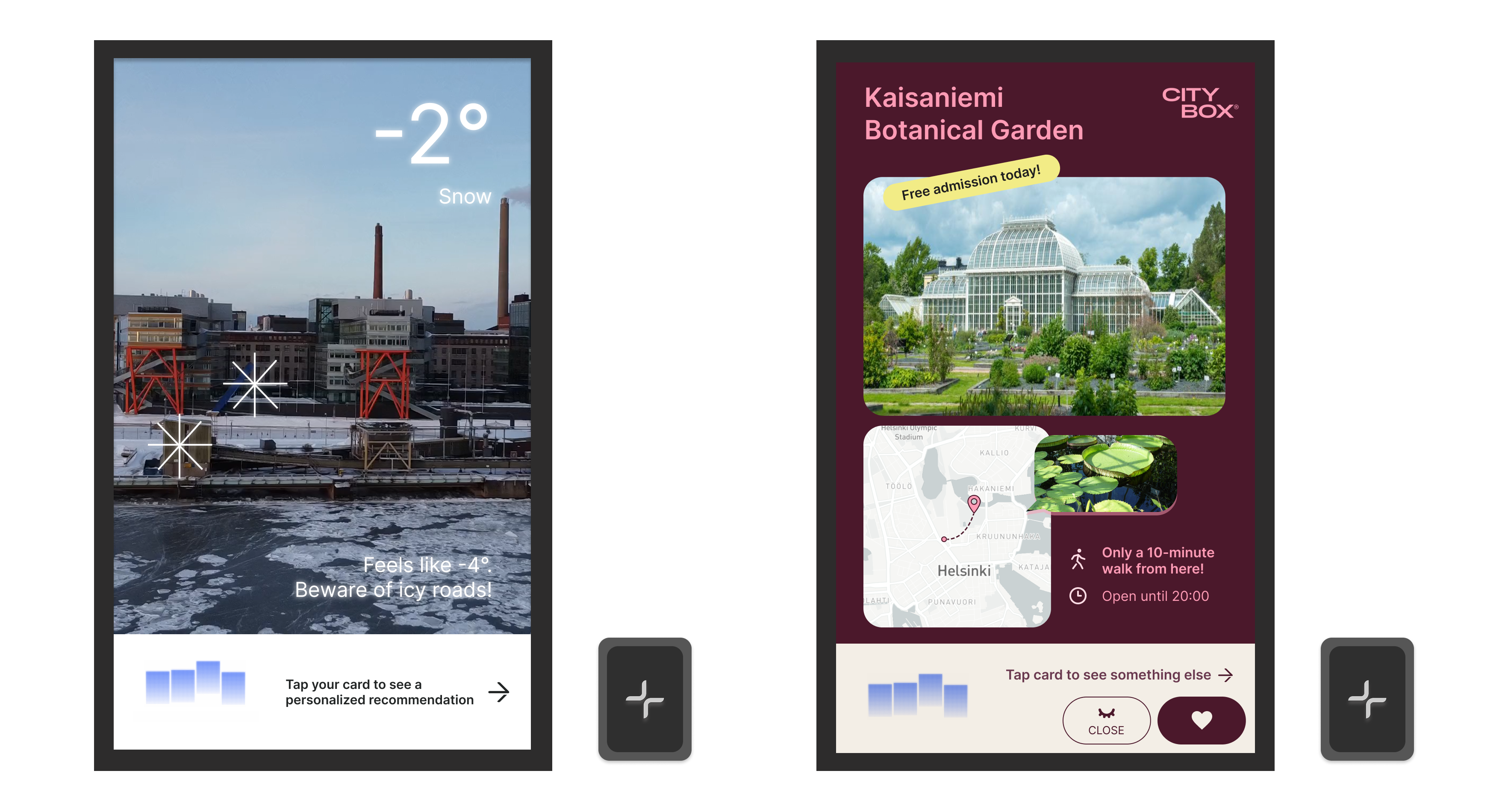
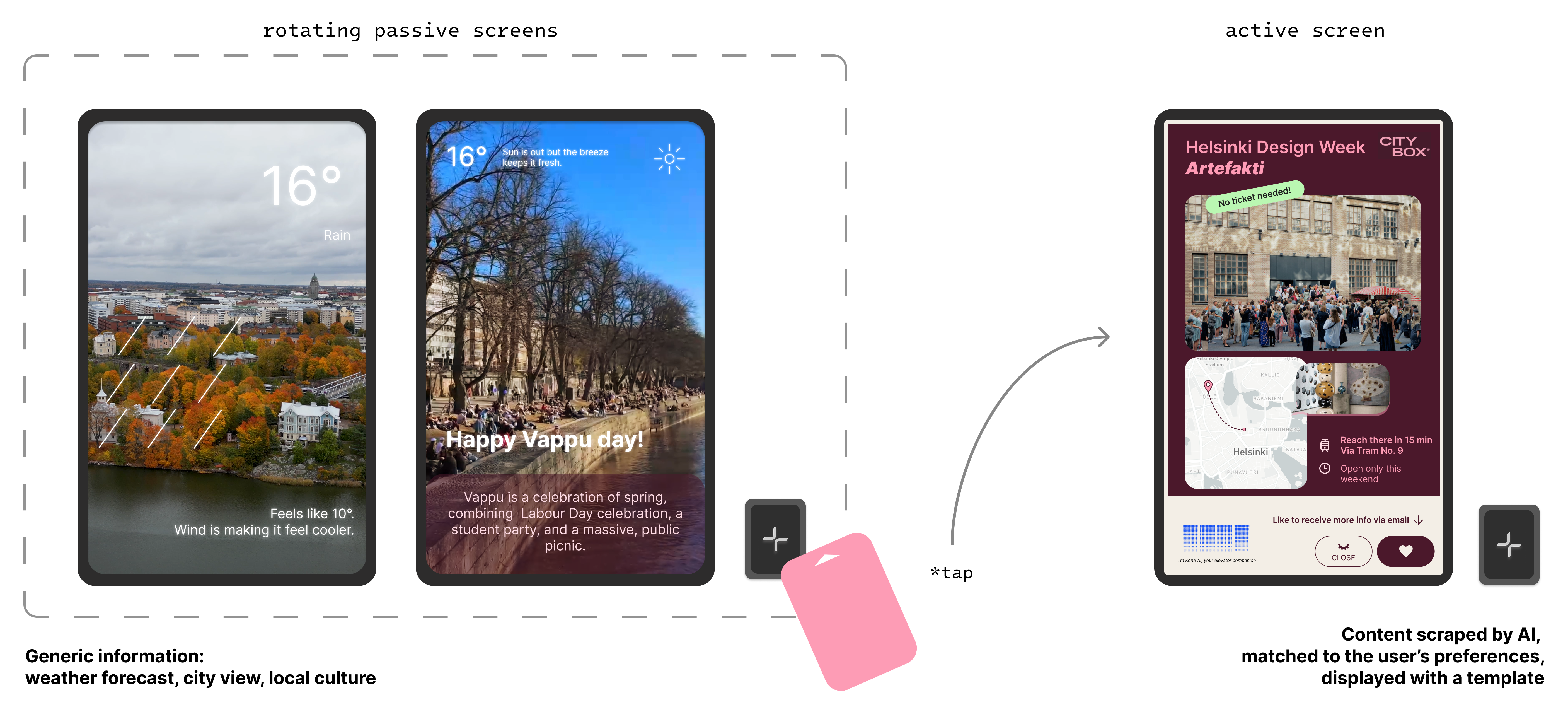
The concierge shouldn't be in everyone's face and require every elevator rider to become a user. Therefore, we designed the concierge around absence as the default. We designed two interactive states: a passive screen serves generic information to everyone, until the guest invites the AI by tapping their hotel key card and marking an explicit interaction.
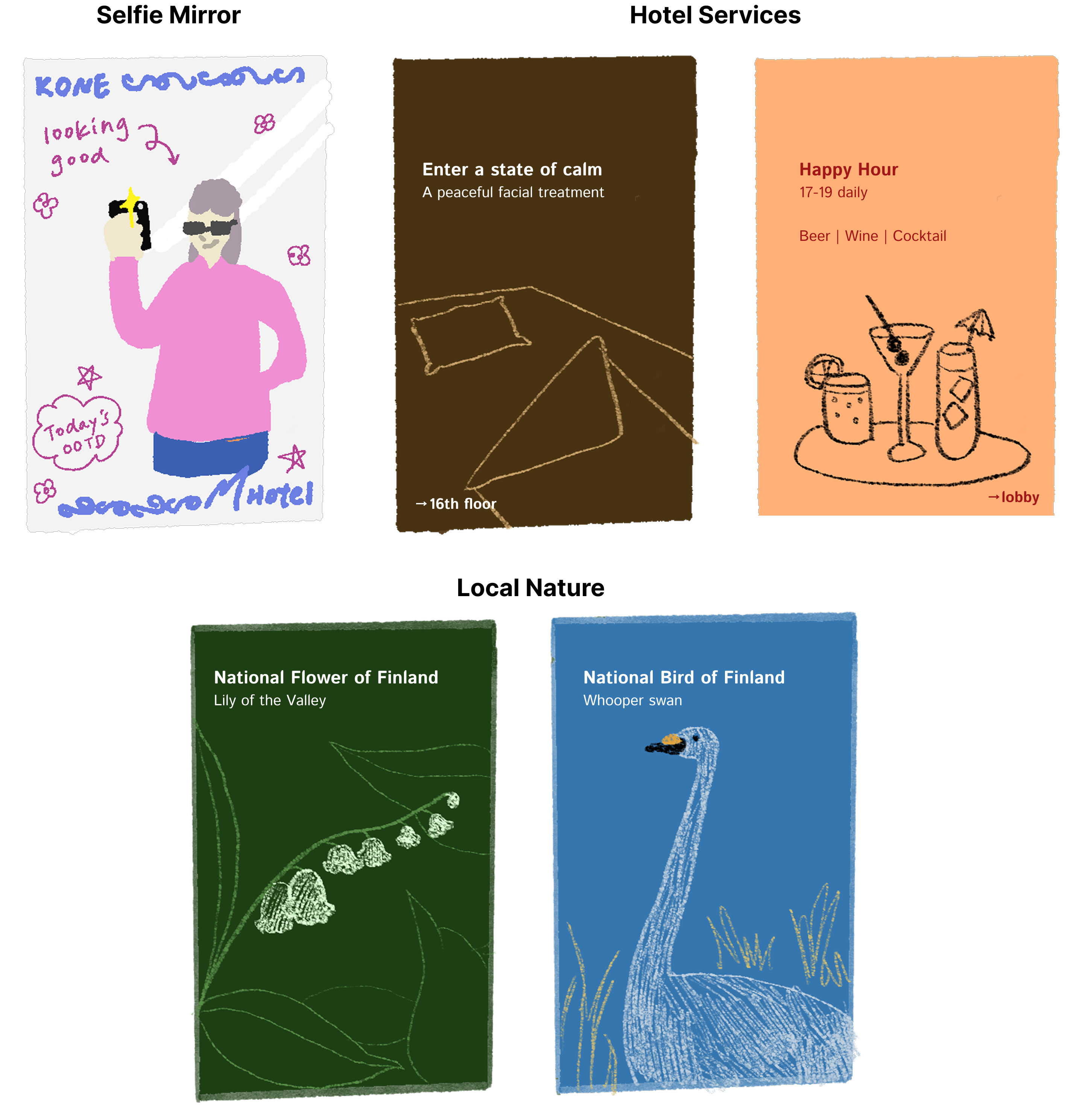
We explored a couple passive screen designs with the goal of providing value without demanding attention.
Designing for worthwhile information
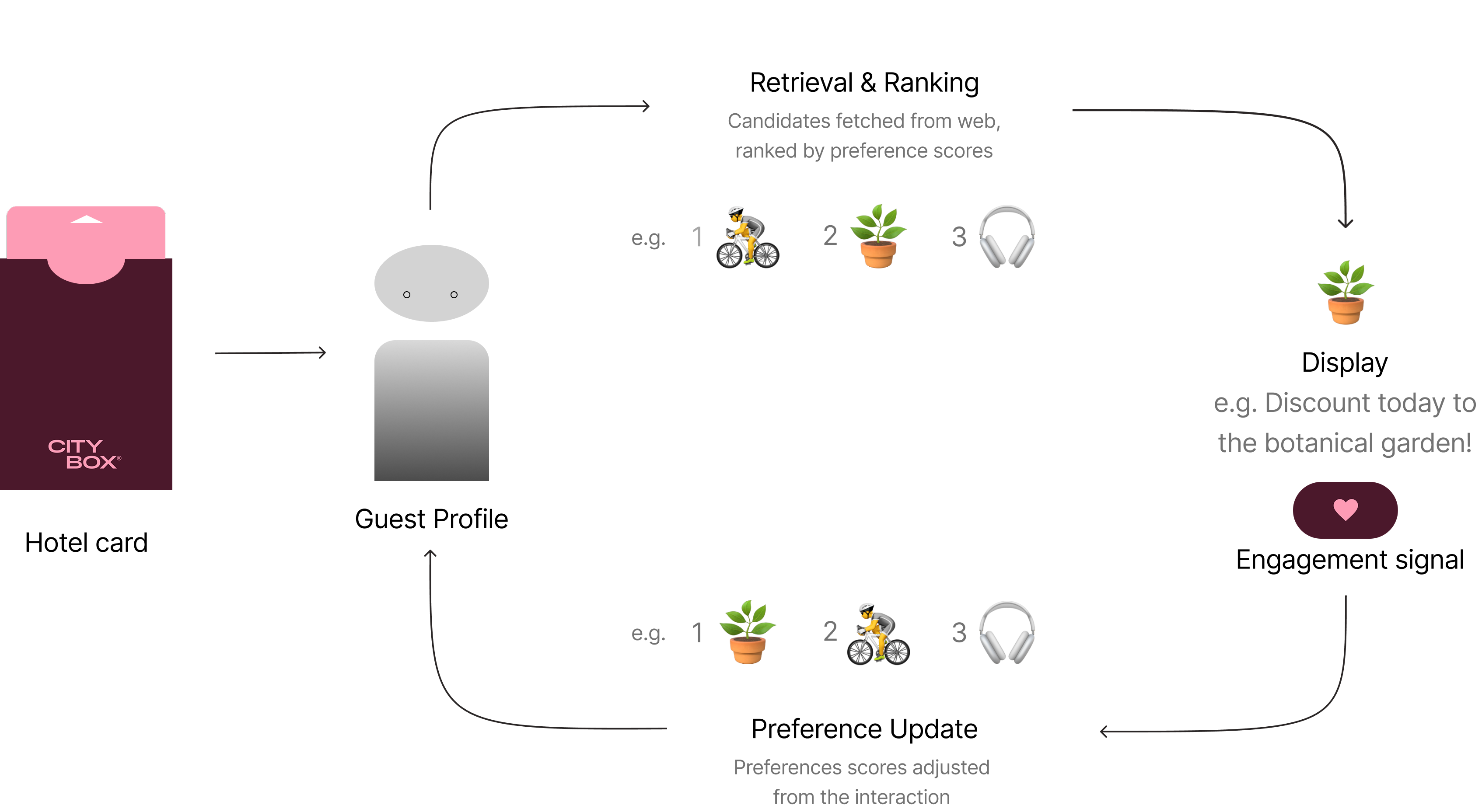
I designed the feedback loop of our recommendation system to treat engagement signals as positive feedback that indicates a user’s interest in a particular type of information. We took inspiration from the reinforcement mechanism underlying doom-scrolling: the more a user interacts with a certain type of content, the stronger the signal that it resonates with them.
These preferences are then stored as part of the user’s interaction data and fed back into the recommendation system, allowing the concierge to continuously customize content shown to the user.
These preferences are then stored as part of the user’s interaction data and fed back into the recommendation system, allowing the concierge to continuously customize content shown to the user.
Designing for natural interaction in a shared space
We deliberately said no to two seemingly intuitive features. These decisions were grounded in user interviews, storyboard evaluations, and desktop research.
1. No voice.
Speaking to an assistant in a shared elevator made people feel awkward. A visual interface, on the contrary, allows guests to browse and interact at their own pace. However, omitting voice input also limited our input space. To compensate, we introduced greater variety in the information displayed (e.g. attraction recommendations, local culture and festivals, timely discounts, etc.), increasing the likelihood that users would come across something that piqued their interest.
2. No humanlike avatar.
We also chose not to portray the concierge with a human-like character. Across cultures, a human-shaped concierge risks reading as unsettling rather than friendly, a phenomenon known as the uncanny valley. Keeping the concierge visually absent also preserves user autonomy, as it avoids asking users to engage with it as though it were a person.
1. No voice.
Speaking to an assistant in a shared elevator made people feel awkward. A visual interface, on the contrary, allows guests to browse and interact at their own pace. However, omitting voice input also limited our input space. To compensate, we introduced greater variety in the information displayed (e.g. attraction recommendations, local culture and festivals, timely discounts, etc.), increasing the likelihood that users would come across something that piqued their interest.
2. No humanlike avatar.
We also chose not to portray the concierge with a human-like character. Across cultures, a human-shaped concierge risks reading as unsettling rather than friendly, a phenomenon known as the uncanny valley. Keeping the concierge visually absent also preserves user autonomy, as it avoids asking users to engage with it as though it were a person.
Takeaways
Engineer <--> Designer mindsets — Coming from an engineering background, my instinct is to find pain points, optimize inefficiencies, and solve problems. For me, this project was refreshing because there were no apparent pain points to solve. Learning to design for experience and restraint rather than pure function is the perspective I carry from this project into AI interaction design.
Yes, AI. But... — It is easy to treat AI as the solution to everything. However, capability does not simply make interaction more meaningful. This project taught me to step back and ask what kind of interaction is actually enjoyable for a broad range of people. As Uncle Ben famously says, "With great power comes great responsibility." ;)
Yes, AI. But... — It is easy to treat AI as the solution to everything. However, capability does not simply make interaction more meaningful. This project taught me to step back and ask what kind of interaction is actually enjoyable for a broad range of people. As Uncle Ben famously says, "With great power comes great responsibility." ;)